Hik-Connect3.11.1.1023
Publisher Description
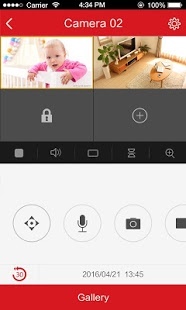
The Hik-Connect app is designed to work with Hikvision series DVRs, NVRs, Cameras, Video intercom devices and Security control panels. With this app, you can watch real-time surveillance video or play it back from your home, office, workshop or elsewhere at any time. When alarm of your device is triggered, you can get an instant notification from Hik-Connect app.
Key Features:
1. Real-time monitoring with PTZ control
2. Video playback
3.Two-way audio intercom
4. Instant alarm notifications with pictures and videos
5. Answer calls from doorbells/video intercom devices
6. Arm security control panel remotely
7. Share devices to others with limited permissions
8. Convenient and secure fingerprint login
About Hik-Connect
The company that develops Hik-Connect is HIKVISION HQ. The latest version released by its developer is 3.11.1.1023. This app was rated by 20 users of our site and has an average rating of 3.0.
To install Hik-Connect on your Android device, just click the green Continue To App button above to start the installation process. The app is listed on our website since 2019-10-25 and was downloaded 47,396 times. We have already checked if the download link is safe, however for your own protection we recommend that you scan the downloaded app with your antivirus. Your antivirus may detect the Hik-Connect as malware as malware if the download link to com.hikvision.hikconnect is broken.
How to install Hik-Connect on your Android device:
- Click on the Continue To App button on our website. This will redirect you to Google Play.
- Once the Hik-Connect is shown in the Google Play listing of your Android device, you can start its download and installation. Tap on the Install button located below the search bar and to the right of the app icon.
- A pop-up window with the permissions required by Hik-Connect will be shown. Click on Accept to continue the process.
- Hik-Connect will be downloaded onto your device, displaying a progress. Once the download completes, the installation will start and you'll get a notification after the installation is finished.
Program Details
System requirements
Download information
Pricing
Version History
version 3.11.1.1023
posted on 2019-10-25
1.Support the to-be-released new access control device (Model: DS-K1T331 series). You can open the door remotely by biometric verification of the phone, and also able to live view the camera on device remotely.
2.Support Axiom security control panel for more configuration functions. Such as add cameras to the security control panels, phone call and SMS configuration and partition management.
3.Support Pyronix devices’ alarm notification, get alarm history and do video verification.
version 3.10.4.0925
posted on 2019-10-12
1.Bug fixes.
version 3.9.0.0715
posted on 2019-08-07
1. Support 64-bit architectures.
2. Bug fixes.
version 3.8.1.0620
posted on 2019-06-25
1. Support LINE App linkage, LINE can receive device alarm notification and alarm related pictures. (Limited to Thailand and Taiwan).
2. Shared users also support setting device’s silence mode.
3. Click on the message in the phone’s notification center to go directly to the details page of the message.
4. Support EZVIZ doorbell.
5. Support to control the camera's wiper on and off.
6. Bug fixes.
version 3.3.1.0130
posted on 2018-02-04
Upgrade online devices added by IP/Domain.
Add channel-zero enabling/disabling switch. By default, it is disabled.
Support sharing saved photo and video.
Bug fixed.
version 1.2.2.0909
posted on 2016-09-08
1. Fixed bugs
